
Wireless networks are often assumed to be secure once WPA2 is enabled. In practice, that assumption is only partly true. While WPA2 remains widely used and is not inherently broken, the real security of a wireless network depends heavily on how it is configured, how client devices behave, and how strong the Pre-Shared Key (PSK) actually is. As a result, the protocol label alone can sometimes create a misleading sense of security.
This becomes clearer when looking at how wireless networks generally behave in real-world environments. Access points continuously broadcast their presence, clients connect and reconnect automatically, and authentication exchanges take place in the background with little visibility to the user. These behaviours are fundamental to how Wi-Fi works, but they also influence how wireless networks can be assessed from a security perspective.
In recent years, the barrier to performing this type of testing has reduced significantly. Low-cost, widely available hardware is now capable of interacting directly with wireless traffic, making these techniques far more accessible than they once were. One example of this is the ESP32 Marauder project, which runs on ESP32-based hardware and exposes features for scanning, monitoring and capturing wireless traffic. When combined with the Cheap Yellow Display (CYD), a low-cost ESP32 board with an integrated screen and SD card support, a compact and practical platform for building a wireless testing tool with minimal setup is easily created.
In this article, we use this setup to build a practical wireless testing lab and walk through techniques such as deauthentication and WPA2 handshake capture. Along the way, we look at how wireless clients behave during authentication and reconnection, why handshake capture works, and how weak WPA2 passphrases can still create practical risk in real-world environments.
All testing described in this article was performed against personally owned equipment in a dedicated lab environment configured specifically for this purpose. The aim is to improve understanding of wireless security and demonstrate how configuration choices and password strength directly impact the resilience of wireless networks.
Core wireless concepts
Before looking at the CYD device and the Marauder firmware, it is important to understand how a WPA2-protected wireless network behaves during normal operation. The techniques demonstrated later in this article do not rely on breaking WPA2 itself. Instead, they take advantage of how wireless networks advertise themselves, how clients authenticate, and how certain types of traffic are handled.
WPA2-PSK and the 4-Way handshake
WPA2-PSK is one of the most widely deployed wireless security mechanisms. In this model, both the client and the access point share the same secret in advance, typically a user-defined Wi-Fi password. A key point that is often misunderstood is that this password is never transmitted across the network during authentication. Instead, WPA2 uses the pre-shared key as input into a challenge–response style exchange known as the 4-way handshake.
This handshake occurs when a client connects or reconnects to a network and is responsible for deriving the key material used to protect the session. It is carried within EAPOL-Key frames, which are specifically used for authentication-related exchanges in WPA2.
At a higher level, the handshake works as follows:
- The access point generates a random value (ANonce) and sends it to the client
- The client generates its own random value (SNonce) and uses both values, along with the pre-shared key material, to derive session key material
- The client sends its nonce and a cryptographic message integrity check back to the access point
- The access point performs the same calculation and verifies the result
The access point and client then confirm the derived keys and complete the exchange, allowing encrypted communication to begin The important detail here is that the password itself is never exposed. Instead, both sides independently derive the same key material and prove possession through cryptographic validation.
From a testing perspective, the value of this exchange lies in what it enables. If the 4-way handshake is captured, it provides enough information to perform offline password attacks against the network. Rather than interacting with the access point, a tester can take the captured handshake and repeatedly test candidate passwords by reproducing the same key derivation process and comparing the result against the captured authentication data. This attack path does not mean WPA2 encryption is inherently broken, but it does mean WPA2-PSK remains highly dependent on password strength.
Management frames, EAPOL and why timing matters
To understand what tools such as Marauder are actually showing, it is important to distinguish between different types of wireless traffic, particularly management frames and authentication traffic.
Management frames are responsible for how clients and access points interact. They are used to advertise networks, manage association, and control connection state. Beacon frames are one example, continuously broadcasting the presence of a network. Another important example is the deauthentication frame, which is used to terminate an active connection between a client and an access point. Under normal operation, these frames allow devices to join and leave networks cleanly. However, because management frames were historically not protected in the same way as encrypted traffic, they can be abused to forcibly disconnect clients. This behaviour is what enables deauthentication-based attacks.
In contrast, the 4-way handshake is not carried in management frames, but in EAPOL-Key frames. EAPOL (Extensible Authentication Protocol over LAN) is the protocol used to carry the WPA2 authentication exchange between the client and the access point. When analysing captures, these handshake messages appear as EAPOL traffic. This distinction is important. Beacon and management traffic may be visible throughout a capture, whereas EAPOL traffic is event-driven and is only generated when a client connects or reconnects to the network.
As a result, simply monitoring the correct channel does not guarantee that useful authentication data will be captured. A network may appear active, but if no authentication event occurs during the capture window, no handshake will be present. This is where timing and client behaviour become important. If a client reconnects naturally, a handshake will be generated. Alternatively, forcing a reconnection, for example through deauthentication, can trigger a new handshake and create an opportunity to capture the required EAPOL frames.
Hardware & lab setup
Before installing the firmware and performing any testing, a small lab environment was prepared with a few low-cost components. The goal was to create a realistic but fully controlled wireless environment, separate from the primary home network, where deauthentication behaviour and WPA2 handshake capture could be safely demonstrated.
The main device used for the wireless testing was an ESP32-2432S028R, commonly referred to as the Cheap Yellow Display (CYD). This is an ESP32-based development board with an integrated touchscreen display and microSD card support. For this setup, the integrated display allows the Marauder interface to be used directly on the device, while the microSD card allows packet captures to be saved locally for later analysis.
The following components were used throughout this lab:
- ESP32-2432S028R (Cheap Yellow Display – CYD)
- microSD Card (8–32GB, FAT32 formatted)
- USB cable (for power and flashing firmware)
- TP-Link TL-WR841N wireless router
- Power source (laptop USB or power bank)
The TP-Link TL-WR841N was used as a dedicated test access point. It is a simple 2.4 GHz router that supports WPA2-PSK and manual channel configuration, which makes it well suited to this type of controlled wireless testing. The exact model is not important, but the access point should allow the wireless channel and security mode to be configured manually, as these settings directly affect how reliable the later capture process will be.
The test wireless network was configured with the following characteristics:
- 2.4 GHz wireless network
- fixed wireless channel (3)
- WPA2-PSK using AES
- known SSID (SentriumLab)
- weak passphrase
- single client device connected during testing
Using a fixed channel kept the capture process predictable. Once the access point was set to channel 3, the Marauder device could be configured to listen on the same channel while the client disconnected and reconnected. The weak passphrase was used purely for demonstration purposes, to show how offline password attacks become practical once a valid handshake has been captured.
The router itself did not require internet access for the demonstrations performed in this article. The relevant behaviour takes place directly between the client device and the access point, meaning that the lab could be run as a standalone wireless network. This also ensured the testing remained isolated and did not affect any other devices in the primary home network.
Device setup: Installing ESP32 Marauder on CYD
With the hardware and lab environment ready, the next step was to get ESP32 Marauder running on the CYD. This is where the setup starts to feel a bit more real, as the device moves from being a small ESP32 touchscreen board to something we can actually use for wireless testing.
For the installation, the Spacehuhn web-based flasher was used, following the approach referenced in the official ESP32 Marauder documentation. This method allows firmware to be written directly to the device from the browser, while still providing control over how each component is mapped in memory.
Rather than uploading a single firmware file, this approach requires the bootloader, partition table, boot application, and the main Marauder firmware binary to be supplied separately. Each of these components must be written to its required offset in flash memory so the device can boot correctly and load the correct firmware.
The flashing configuration used for this setup is shown below:
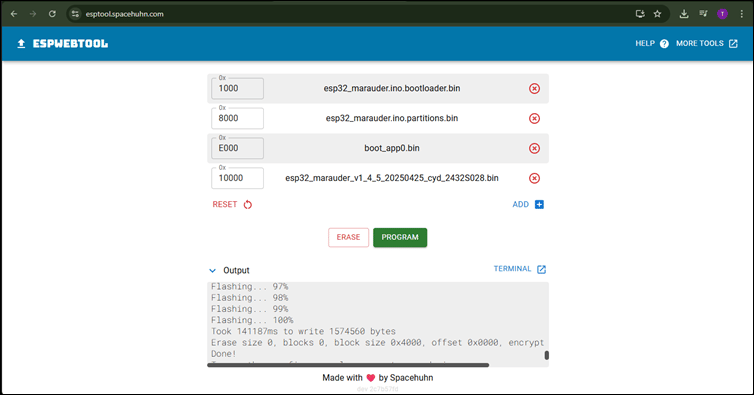
For this lab, the main firmware binary used was:
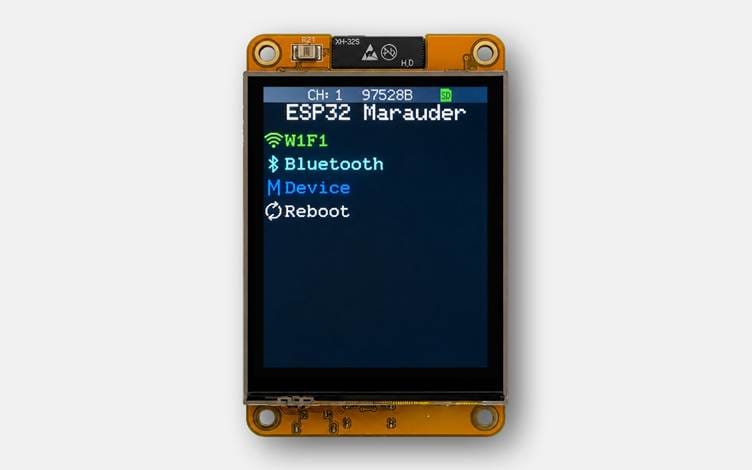
This version was selected from the official ESP32 Marauder releases, as it is specifically built for the CYD hardware and includes support for the integrated display and SD card functionality. Once the required files were configured and written successfully, the device was disconnected and then connected to a power source to boot into the newly installed firmware. The Marauder interface loaded on the display without issue and at this point, the device was ready for testing:
Deauthentication and WPA2 handshake capture
As discussed earlier, WPA2 handshake traffic is only generated when a client connects or reconnects to a wireless network. This creates a practical challenge during testing. A network may be visible, and the correct channel may be selected, but no useful authentication data will be captured unless a client performs a connection event during the capture window.
One way to trigger this behaviour is through deauthentication. Deauthentication frames are management frames used to terminate a connection between a client and an access point. In normal operation, they allow devices to disconnect cleanly. However, where Protected Management Frames are not enforced, these frames can be spoofed and used to force a client to disconnect from the network.
In this section, deauthentication is used disconnect a client from the network. When the client reconnects, it performs a new WPA2 authentication exchange, which is the traffic we want to capture. The resulting capture is then exported, converted into the right format and testing with Hashcat.
Step 1: Identifying the target network
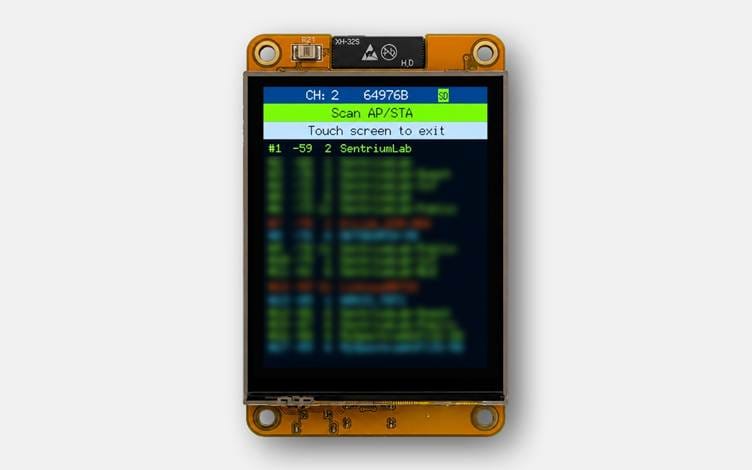
First, we need to scan for nearby wireless activity and allow Marauder to build its internal access point list.
- WiFi > Sniffers > Scan All
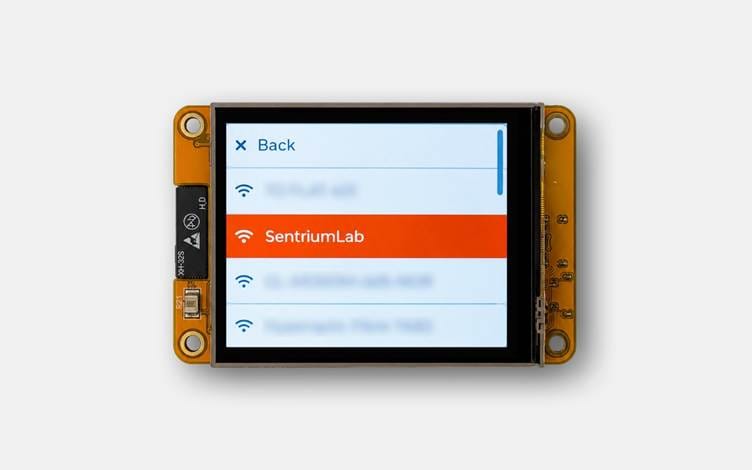
Marauder will begin scanning for nearby access points and display them directly on the screen as they are discovered. In this case, the test SSID ‘SentriumLab’ can be seen within the scan results below.
This process also stores the discovered access points internally within Marauder, allowing them to be selected later during the attack workflow.
Step 2: Selecting the target access point
Next, we need to select the access point that will be used for the deauthentication attack.
- WiFi > General > Select APs
The access points discovered during the previous step should now be listed. We can then select ‘SentriumLab’ from the list and click Back to return to the previous menu.
Step 3: Triggering the deauthentication attack
With the target access point selected, the deauthentication attack can now be launched.
- WiFi > Attacks > Deauth Flood
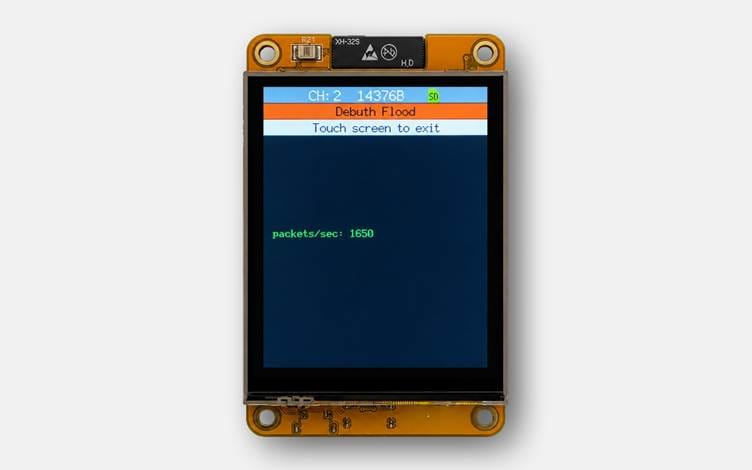
Once enabled, Marauder begins transmitting deauthentication frames against the selected access point. In this case, the goal is to force the connected client device to disconnect from the ‘SentriumLab’ wireless network and then reconnect automatically. During the attack, Marauder displays the number of deauthentication frames being transmitted per second directly on the screen, as shown below:
If the deauthentication attack is successful, the target device should briefly lose its connection to the wireless network.
Tip: Since this lab network was running as a standalone wireless environment without internet access, an easy way to confirm the disconnect was to try accessing the router management page at 192.168.1.1 from the client device. While the deauthentication attack was active, the page became temporarily unreachable, confirming that the client had been disconnected from the access point.
Step 4: Capturing WPA2 handshake traffic
Once the client has been disconnected, the next step is to capture the WPA2 authentication traffic generated when the device reconnects to the network.
In Marauder, this can be done using the raw packet capture functionality, which listens for wireless traffic on a selected channel and saves the captured frames directly to the microSD card as a `.pcap` file for later analysis.
- Navigate to WiFi > Sniffers > Raw Capture
We then use the + and – controls to select the correct wireless channel and then leave the capture running.
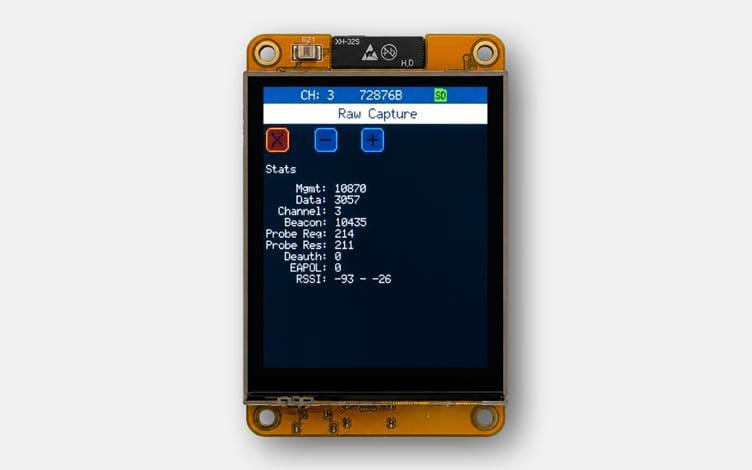
For this lab, the router was configured to use channel 3 to keep the capture process predictable and avoid unnecessary troubleshooting. This is important because the ESP32 can only monitor a single wireless channel at a time. If the wrong channel is selected, the access point may still be visible nearby, but the authentication traffic will not be captured.
With the capture is running, we reconnect the client device to the wireless network. As it reconnects, a new WPA2 4-way handshake should be generated between the client and the access point. If Marauder is listening on the correct channel during this moment, the EAPOL handshake traffic should be captured and written to the SD card.
At this stage, it is worth leaving the capture running for a short period to ensure enough traffic has been collected before stopping it and removing the SD card for analysis.
Step 5: Exporting the capture
Once the client has reconnected and the capture has been left running for a short period, we can stop the capture and remove the microSD card from the CYD.
We then connect the microSD card to a laptop and confirm that the capture file has been written successfully. In this lab, the raw capture was saved as ‘raw_0.pcap’:

At this point, the presence of the file confirms that Marauder has written captured traffic to the SD card. The next step is to check whether the capture contains usable WPA2 handshake data and convert it into a format that Hashcat can use.
Step 6: Converting the capture for hashcat
The capture generated by Marauder is saved as a standard `.pcap` file containing raw wireless traffic. However, before the handshake can be used for password testing, the relevant WPA2 authentication data needs to be converted into Haschat-compatible format. One simple way to do this is with Hashcat’s official cap2hashcat converter.
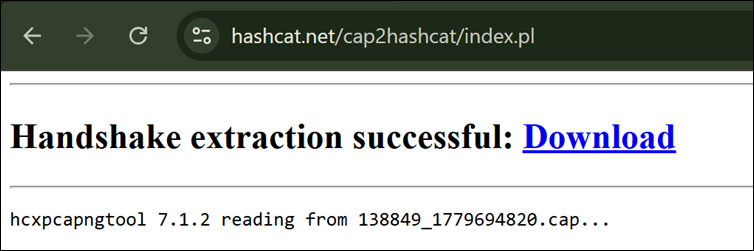
The ‘raw_0.pcap’ file can then be uploaded to cap2hashcat for processing. If valid WPA2 handshake traffic is present, the tool will extract the relevant authentication material and generate a Hashcat-compatible output in mode 22000, ready to be used for an offline password attack.
Step 7: Running the offline password attack
After the conversion succeeds, cap2hashcat provides the generated file, in this case ‘138849_1779694820.hc22000’. This file can now be passed to Hashcat to test password candidates against the captured WPA2 handshake offline.
sudo hashcat -m 22000 138849_1779694820.hc22000 Pwdb_top-10000.txt -r append-exclamation.ruleFor this demonstration, the lab network was configured with a deliberately weak password so the attack chain could be shown end-to-end. A small custom rule was also used to append an exclamation mark (`!`) to each password candidate from the wordlist, giving Hashcat a few extra variations to try without modifying the wordlist itself.
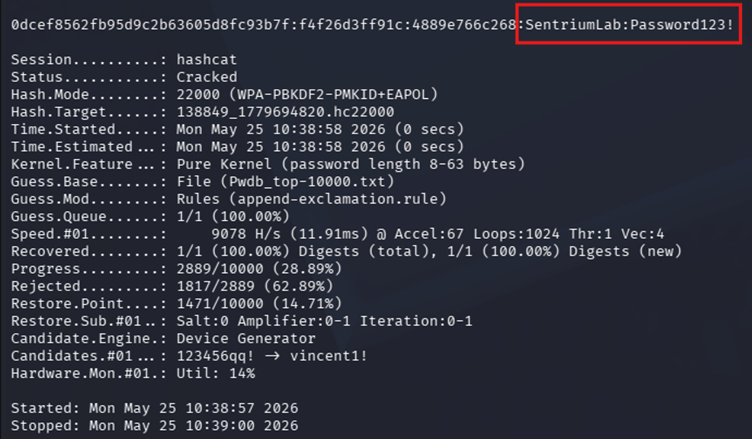
In this case, the WPA2 password for the lab network was recovered successfully within seconds using the captured handshake, a relatively small wordlist, and a simple mutation rule! Seeing the password appear after capturing authentication traffic from the network highlights just how important password strength still is in WPA2-PSK environments. Even though WPA2 itself is not “broken”, weak or predictable passwords can still make wireless networks surprisingly vulnerable once a valid handshake has been captured.
Marauder was able to force a reconnection, the raw capture contained the WPA2 handshake, and Hashcat successfully validated the correct passphrase offline. This is the key risk with weak WPA2-PSK passwords: the password is never transmitted directly, but once a valid handshake has been captured, weak or predictable passphrases can still be recovered without any further interaction with the wireless network.
What’s next?
Once the WPA2 passphrase has been recovered, Wi-Fi access has effectively been achieved. At this point, an attacker may be able to join the wireless network as a valid client and interact with any systems or devices that are reachable from that network.
The impact depends on how the wireless environment is configured. From this position, an attacker could attempt to identify other connected users or devices, review exposed services, and check the access point or router management interface for weak or default administrative credentials. If these credentials are present, the attacker may be able to weaken the configuration further, change wireless settings, or gain additional control over the device.
Where the wireless network is not properly segmented, this access could also provide a route into other parts of the environment. For example, an attacker may be able to reach internal systems, attempt lateral movement, or pivot towards other networks depending on routing, firewall rules and client isolation controls.
Security considerations and mitigations
From a defensive perspective, the important point is that the behaviour demonstrated in this article does not rely on the WPA2 password being sent across the air in clear text. The risk comes from what can be done once valid authentication traffic has been captured. Rather than looking for a single fix, the focus should be on making the overall workflow harder to complete.
The first and most important area is still the wireless passphrase. Once a valid handshake has been captured, the access point is no longer involved in the password attack. Hashcat can test candidates offline, meaning the usual protections associated with online authentication, such as throttling or account lockout, do not apply in the same way. This is why short, reused, or predictable wireless passwords remain risky, even if they appear to meet basic complexity requirements. For WPA2-PSK networks passphrases are typically limited to between 8 and 63 characters. Where possible, these should be long and genuinely unpredictable, as this provides much stronger protection than passwords that follow common patterns.
It is also important to consider how the handshake is being triggered. In this lab, deauthentication was used to force the client to reconnect and generate fresh authentication traffic. Protected Management Frames (PMF) help defend against this by protecting management traffic such as deauthentication and disassociation frames. Where PMF is enabled and supported by both the access point and client device, spoofed deauthentication becomes much harder to abuse, making the capture process less reliable, although naturally occurring handshakes can still be captured passively.
Other configuration choices can also affect the practicality of this attack path. WPS should be disabled where it is not explicitly required, as it can introduce a weaker enrolment path that undermines the strength of the wireless passphrase. Similarly, WPA2/WPA3 transition modes should be treated as a compatibility measure rather than a long-term target state. Where WPA3 is available and supported by client devices, using WPA3-Personal without WPA2 fallback provides a cleaner migration path.
Modern wireless configurations improve this further. WPA3-Personal uses Simultaneous Authentication of Equals (SAE), which provides stronger resistance against offline password guessing than the traditional WPA2-PSK model. However, many environments still need to support WPA2 because of older client devices and IoT hardware. Where WPA2 remains in use, legacy compatibility modes should be avoided unless there is a clear requirement.
For larger or higher-risk environments, WPA2-Enterprise or WPA3-Enterprise should also be considered. Moving away from a single shared wireless passphrase allows access to be tied to individual users or devices, making revocation and monitoring much easier if a device is lost, a user leaves, or credentials are suspected to have been exposed.
Finally, it is worth considering what wireless access would provide if a key was ever recovered. Segmentation does not prevent handshake capture or offline cracking, but it can limit the impact of a compromised wireless password. Guest devices, IoT systems and internal workstations should be separated where possible, so that access to one wireless network does not automatically provide access to more sensitive parts of the environment.
Conclusion
This article started with a simple idea: use a low-cost ESP32 device to better understand how WPA2 handshake capture works in practice. By building a small lab, forcing a client reconnection, capturing the resulting authentication traffic and testing the passphrase offline, we can see how each part of the attack chain fits together.
Along the way, we looked at the wireless behaviours that make this possible, including management frames, deauthentication, EAPOL traffic and the WPA2 4-way handshake. What becomes clear is that WPA2-PSK is not unusable or inherently broken. When deployed properly, it can still provide strong protection. The risk comes from the controls around it, where a weak passphrase, unprotected management traffic or legacy compatibility requirements can turn normal wireless behaviour into a practical attack path.
What makes this especially interesting is how accessible the tooling has become. The CYD and ESP32 Marauder setup is inexpensive, portable and easy to experiment with, but still provides clear visibility into real wireless behaviour. That makes it a useful learning platform, while also showing that these techniques are no longer limited to expensive or specialist equipment.
As hardware like this becomes easier to obtain and use, wireless security deserves the same level of attention as other exposed parts of an environment. A small lab using the CYD and ESP32 Marauder is enough to make WPA2 handshake capture much easier to understand, but it also shows why weak wireless configuration should not be overlooked. Strong passphrases, modern protections and careful network design are simple ideas, but they make a real difference when defending against this type of attack.
For businesses who need more guidance on wireless or internal network security, Sentrium’s Network and Infrastructure Penetration Testing services can help identify weaknesses and provide practical recommendations to reduce exposure.